We Were Bleeding Money and Didn't Know It
Here's the thing about cloud bills: they go up slowly. You don't notice it month to month because no single service spikes. It just... creeps. And before you know it, you're paying significantly more than last quarter for the same product serving the same users.
That was us. We're a small team running QuerySafe on Google Cloud Platform. We expected our bill to grow with users. Instead, it was growing on its own. Same traffic, higher costs. Every month, a little more.
So we blocked a day, opened the billing console, and went line by line through every single service. What we found was embarrassing. A load balancer we didn't need. Containers running 24/7 for a product that gets traffic in bursts. AI calls for empty messages. Temp files nobody was cleaning up. VMs left on from a task three weeks ago.
We fixed all of it. Total savings: 57%. Here's the breakdown.
The Billing Breakdown
| Service | % Change |
|---|---|
| Networking | ↓ 45% |
| Cloud SQL | ↓ 4% |
| Artifact Registry | ↓ 55% |
| Vertex AI | ↓ 77% |
| Cloud Run | ↓ 97% |
| Cloud Storage | ↓ 61% |
| Compute Engine | ↓ 54% |
| Cloud Build | ↓ 33% |
Screenshot from our actual GCP billing console. Every optimization described below is reflected in these numbers.
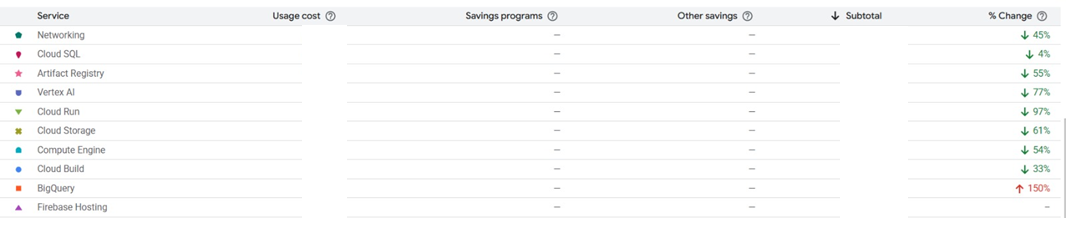
Our GCP billing dashboard after optimization
Networking: The Hidden Tax ↓ 45%
Networking was our single largest line item. More expensive than our database. More expensive than AI inference. For an app with modest traffic, that didn't make sense.
We dug in and found a Cloud Load Balancer that had been provisioned during initial setup. It was charging per-hour forwarding rules plus per-gigabyte processed. But Cloud Run already handles load balancing and SSL termination on its own. The external load balancer was doing work that was already being done natively.
We removed it, pointed our custom domain through Cloud Run's built-in domain mapping, and networking dropped by 45%. No performance impact. No downtime during the switch.
Default setups from tutorials and quickstart guides often include components you don't actually need. Worth questioning every piece in the chain.
Cloud Run: Right-Sizing the Runtime ↓ 97%
97% sounds dramatic, but the fix was simple. Our containers were over-provisioned: multiple always-on instances, more memory than needed, CPU allocated even when nothing was happening.
We made three changes:
- Reduced minimum instances to what the traffic actually required
- Added a startup probe so cold starts were fast enough to not need warm instances sitting idle
- Switched to CPU-only-during-requests billing, meaning we stopped paying for idle compute between requests
Cloud Run is supposed to be pay-per-request, but the default settings lean toward always-on. If you don't actively configure it, you end up paying for compute that's sitting there doing nothing.
Vertex AI: Smarter Model Selection ↓ 77%
AI inference was our third biggest expense. Three things helped here:
- Switched to a cheaper model variant. Same quality output, lower cost per token
- Added response caching for repeated queries. A lot of chatbot questions are near-identical, and regenerating the same answer every time wastes tokens
- Validated inputs before sending them to the model. Empty messages, duplicate requests, and malformed queries were hitting the API and burning credits for no reason
AI costs scale with how disciplined you are about what hits the model. Every unnecessary token is money out the door.
Cloud Storage: Clean Up After Yourself ↓ 61%
Training a chatbot generates temporary files: extracted text, intermediate processing artifacts, PDF conversions. These were piling up. Nobody was deleting them because nobody was looking.
We set up lifecycle policies to auto-delete temp files after a few days, cleaned out leftover training data from chatbots that had been deleted, and made the pipeline clean up after itself every run.
Storage is cheap. But "cheap times forever" isn't cheap anymore.
Compute Engine: Stop Paying for Idle VMs ↓ 54%
We had VMs that were spun up for specific jobs but nobody turned them off after. Background processing, builds, maintenance scripts. Stuff that ran for a few minutes but the VM stayed alive for hours.
We moved everything possible to serverless. Cloud Run, Cloud Functions, Cloud Build jobs that spin up, do the work, and shut down. If something doesn't need to be running 24/7, it shouldn't be.
The Compound Effect
None of this was groundbreaking on its own. Removing a load balancer, right-sizing containers, caching AI responses, deleting temp files, shutting down idle VMs. Basic operational hygiene. But stacked together, they cut total spend by 57%.
Same traffic. Same performance. Same uptime. We just stopped paying for things we didn't need.
Five Takeaways
- Look at your bill every month. Not quarterly. Monthly. Costs creep up when nobody's watching.
- Don't trust defaults. Quickstart guides are built for simplicity, not for your actual workload. Your production setup should look different from the tutorial.
- Right-size everything. If you're provisioning more than you're using, you're paying for air.
- Use what the platform gives you. If Cloud Run already does load balancing and SSL, don't bolt on another service that does the same thing.
- Clean up after yourself. Set lifecycle policies. If your pipeline creates temp files, your pipeline should delete temp files.
Frequently Asked Questions
Build on infrastructure that scales efficiently.
Get Started Free